
6 in 10 of your online students arrive with a device problem you can't see.
Whether it’s an outdated operating system, an unsupported browser or a slow data connection, an AI platform or help desk can’t detect it, because the problem happens before the first assignment, before there’s any behavior to flag. TechReady.io identifies and helps resolve student device issues before day one with a scan that takes under 30 seconds. No install, no student information required, and a timestamped record you can put in front of accreditation and federal accountability reviewers.
Built for Institutional Buyers. Deployed for Every Student.
Test browser and technology requirements for Canvas, Blackboard, Moodle, & Brightspace
No Install. No Student Information Required.
TechReady runs entirely in the browser: nothing to install, nothing to host. A scan needs no student information. If your institution passes its own student ID, that ID is re-identified only behind your firewall. The scan records technical details only, and the IP address it captures locates the internet provider’s wiring center, not the student’s location. Easy to deploy, easy to approve.
LTI and API Integration Available.
TechReady connects to Blackboard, Canvas, Moodle, and Brightspace via LTI, deploying as a required activity inside any orientation or course workflow. An API feed can push flagged student data into your student success or early-alert platform at the moment of scan. Both are available now. No integration project.
9 Years. 131,000+ Scans. Two Granted Patents.
One of the longest continuous device-readiness datasets in higher education (2017-2026). The core system and method are protected by two granted US patents (Nos. 11,233,842 and 12,160,461). Every scan record is owned entirely by the institution that runs it.
How TechReady.io Works
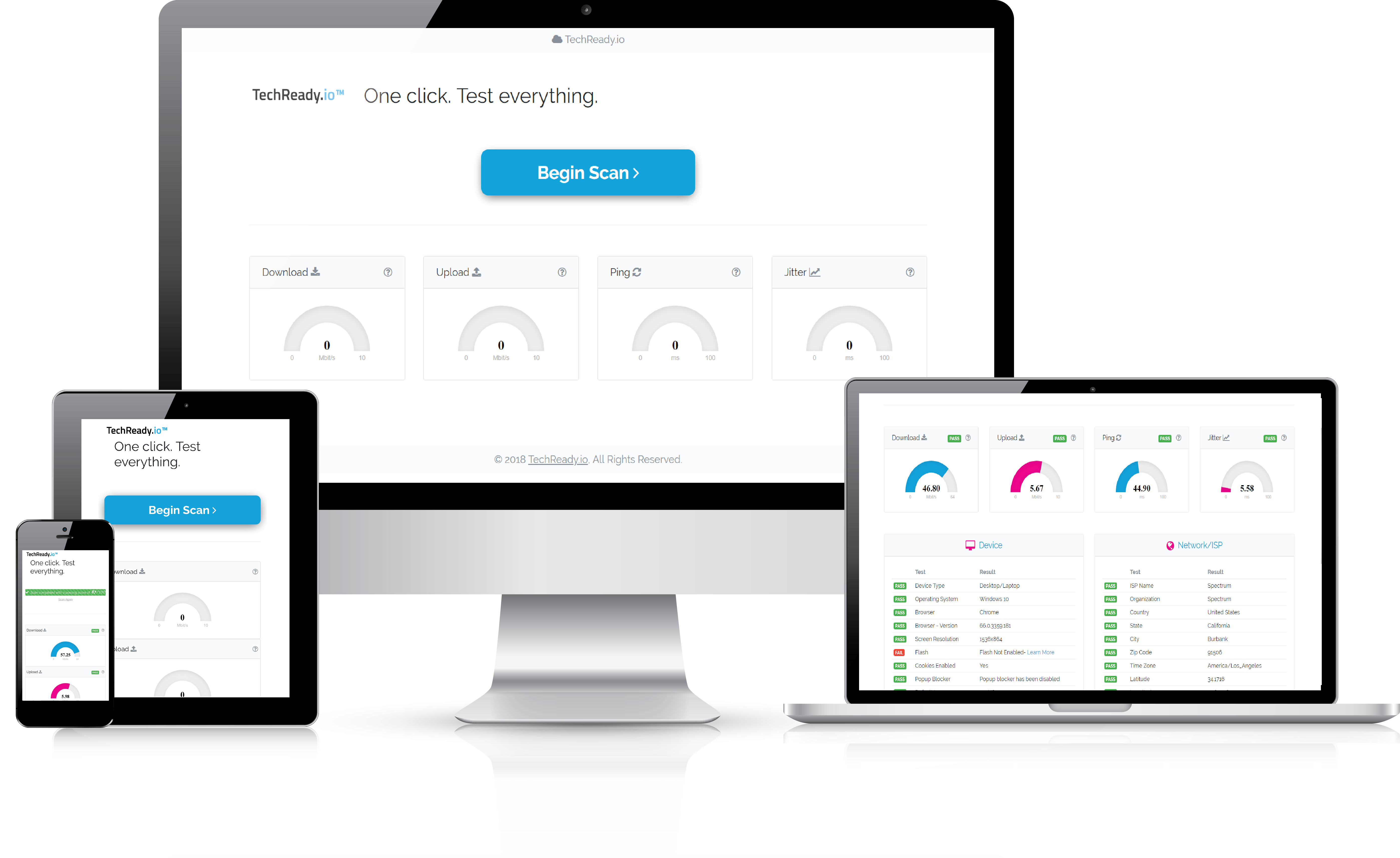
Once a student starts a test, TechReady.io analyzes essential LMS browser and technology requirements, from upload speed to pop-up blocking. Results are delivered in less than 30 seconds with step-by-step instructions to fix common tech issues.
Organizations that use TechReady.io are able to customize tests, which appear on their own branded website, as well as the thresholds that matter for their specific online learning environment.
The TechReady.io dashboard aggregates systemwide test data to give administrators unprecedented insight into the distribution of technologies being used by their students. Student privacy is protected: no student information is required, only the technical details of the device and connection.
Institutions typically deploy TechReady as a required step in an LMS orientation course, ensuring every incoming student completes a scan before their first class. This reaches every incoming student, leaves a dated institutional record for each one, and can put an API-fed flag in your student success platform before the first behavioral signal exists, before any early-alert tool has data to act on.
From Test to Resolution, With Your Help Desk on Standby
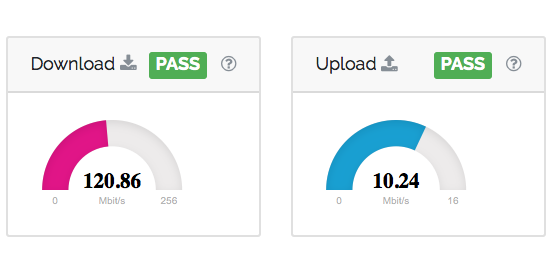
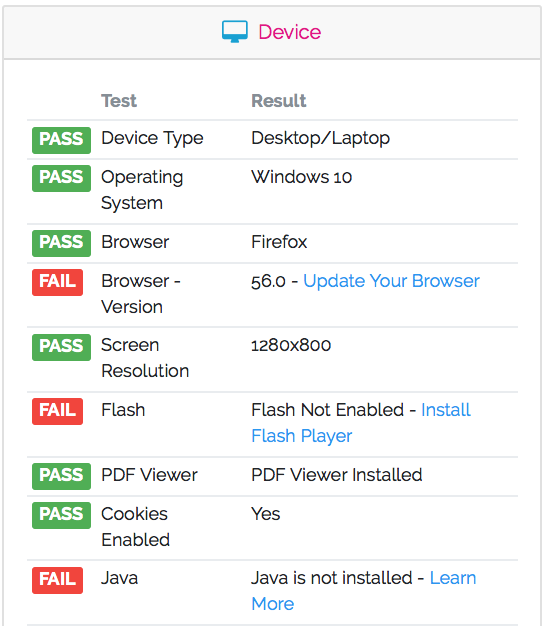
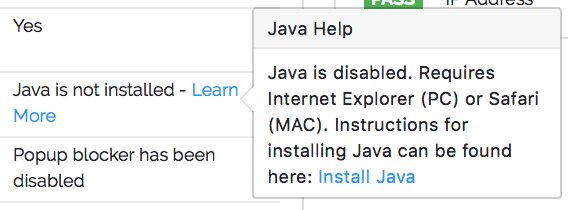
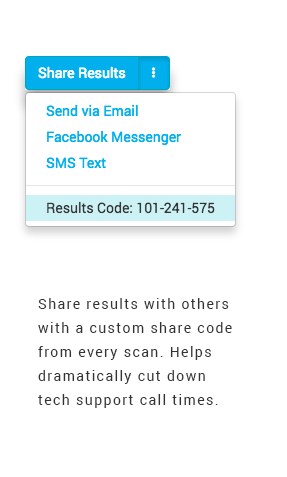
The scan runs in seconds and flags what is likely to get in the way of a student’s first class: an outdated browser, bandwidth below your threshold, a blocked pop-up. Each flag comes with a plain-language fix the student can follow on the spot, and when self-service isn’t enough, a direct line to a person picks it up. The payoff is a lighter help desk and a dated record of what each student was shown and when.
Now Multiply That Across Every Cohort
Run that test on every incoming student, every term, and a one-off fix becomes a process. Each scan posts a dated record to your admin portal and an early flag to your student-success team — so readiness stops being a help-desk moment and becomes a repeatable step in how you retain a cohort. And that record is where the stakes begin: what it documents is exactly what federal and accreditation reviewers are now watching.
Why This Matters More Now Than It Did a Year Ago.
Under the STATS Earnings Accountability rule, published July 1, 2026 and effective July 1, 2027, academic programs are judged on what their graduates earn, so a student who hits a technical barrier in week one and quietly withdraws never appears in that measure at all. But the withdrawal still costs the institution: a lost enrollment, a mark against the retention and completion outcomes accreditors review, and one fewer graduate in that program to prove earnings. The student the earnings rule never sees is the one the institution had the earliest chance to reach.
TechReady gives institutions one of the earliest documented signals in the student lifecycle. It runs at onboarding, from a link or inside the LMS, before a student has generated any behavior for analytics or early-alert tools to read, and before a device problem becomes a help-desk ticket. Those systems react once a student is already struggling. TechReady checks first.
Three pressures. One early signal.
- STATS Earnings Accountability: a program whose graduates don't out-earn the comparison group in two of three years loses federal Direct Loan eligibility.
- 50% Administrative-Capability Standard: too much federal aid in low-earning programs puts the institution's eligibility at risk, Pell included.
- Accreditation overhaul: a federal rule proposed in August would have accreditors review program-level outcomes, including completion, not just enrollment numbers.
What People Say about TechReady.io
Vicki S.
Manager, Instructional Technologies
“TechReady.io to the rescue! It is hard to look back on the time spent on the simple troubleshooting. Kaboom – one link, one click! Simple and easy! A true time saver! There is no need to say more. TechReady.io is a must for any online education program. The new super hero for our IT Help Desk.”
Heather C.
Director of Student Services
“School administrators need better insight into the technology their students and faculty are using in the online classroom. TechReady.io allows schools to quickly understand the needs of students and faculty in order to begin class on the right foot with the proper systems in place to succeed. This service is invaluable for anyone taking part in an online program.”
TechReady Fan
WBU Online Admin
"I love TechReady.io because it cuts down on my call time with students and instructors. I can gather all of the information I need to troubleshoot a computer issue with one click! TechReady's scans are fast, precise, and easy to understand. From browser versions to upload speeds in a matter of seconds, TechReady has saved the day (and valuable time) more than once for me!”
The retention risk is real, and the easiest place to see it is in your own students' numbers.
To find out how TechReady.io would work for your institution, request a demo by emailing us: